
ASUS OmniStor
The zero-trust file management system of choice for enterprises

√ Comprehensive support for enterprise applications such as critical file management, exchange and backup.
√ Robust account login, access control, and file activity tracking to meet compliance requirements.
√ Flexible integration with enterprise applications and deployment environments—outperforming traditional NAS and file servers.
Why OmniStor?

Reduce Costs
Lower hardware and maintenance expenses
Scalable architecture reduces IT workload

Regulatory Compliance
Detailed access control and activity reports
Easily meet security and privacy standards

Data Protection
Built-in data protection mechanisms
Rapid recovery in case of unexpected incidents

Seamless Transition
Stronger security than NAS/file servers
Cloud-to-local synchronization
4 Key Highlights

Flexible Deployment & Open Integration
OmniStor's software-defined storage technology supports a wide range of underlying storage media and various deployment methods—including physical servers, public cloud, and enterprise-owned virtual machines. It can be flexibly deployed within internal enterprise network architectures and also provides APIs for integration with internal enterprise applications and services.
- Near-unlimited capacity with non-disruptive scalability
- API and ICAP support for easy system integration
- Supports the S3 storage protocol, allowing integration with existing storage tools and systems without the need to rewrite workflows.
Granular Permission & Behavior Control
OmniStor provides comprehensive member permission management, allowing enterprises to assign access rights based on departments and roles. It also offers complete file and platform activity logs to support a zero-trust architecture.
- Role-based access control and IP whitelisting
- SSO integration with enterprise credentials
- Comprehensive file activity tracking for audits


Secure Data Exchange & Protection
OmniStor offers comprehensive security settings for both user accounts and files, ensuring maximum protection whether sharing data internally or receiving file requests externally. Its reliable data protection and recovery mechanisms reduce administrative burden and cybersecurity risks—keeping business operations running without interruption.
- Transmission and storage encryption
- Attack Detection with auto sync termination
- Multi-version backups for data recoverability
Seamless NAS Replacement
OmniStor provides Drive-based file streaming to preserve existing user habits and lower the barrier to adoption. Https transmission encryption is used to avoid vulnerabilities associated with the SMB protocol. It also supports access across various mobile devices, with cloud-to-local synchronization for seamless and convenient user experience.
- The same experience as NAS with Drive
- Centralized data management with cloud-local sync
- Access via PC, mobile apps, and browsers

Meeting all data management needs across industries


Product Architecture
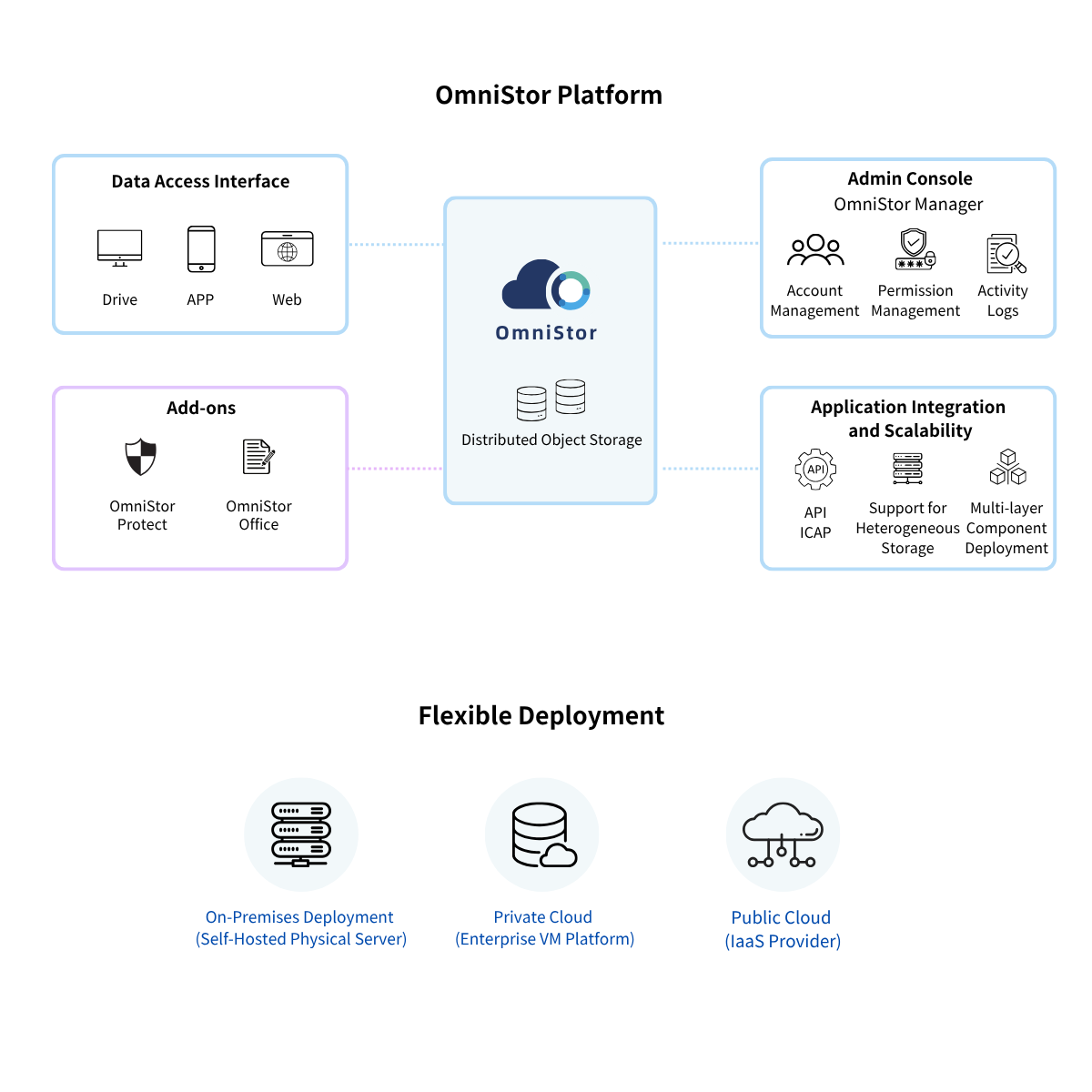
Core Features and Benefits
Core technologies
- Object-based file storage to improve data processing efficiency
- High-availability architecture with multiple redundancy mechanisms to ensure uninterrupted operations
- Software-defined storage supporting multiple heterogeneous storage media interfaces
Deployment
- Modular components with multi-layer network architecture to create the first line of defense
Scalability
- Non-disruptive horizontal expansion based on demand for stable, continuous service
Openness
- API integration for high compatibility with enterprise applications and services
Supports S3 storage protocol for flexible integration with enterprise systems and third-party storage application
Login security
- Integrates with enterprise AD/LDAPand encrypts logins via LDAPSto meet corporate cybersecurity compliance requirements
- Supports Captcha human verification to prevent brute-force password attacks by malicious programs
- Provides an automatic logout mechanism with configurable session timeouts to prevent unauthorized platform access
- Supports one-time passwords (TOTP) and email-based two-factor authentication to enhance identity verification security
- Supports mobile device binding and login verification to strengthen mobile application security
- Allows users to view complete personal login history through the platform for early detection of suspicious threats
- Enables password or biometric authentication (e.g., fingerprint, Face ID) to open the mobile app, enhancing mobile app security protection
- Provides administrator account login security settings and records, such as password cycle policies and account lockouts, to meet audit requirements
Deployment
- Supports AES-256 storage encryption and TLS transmission encryption protocols.
Scalability
- Configure file access permissions by role to enforce data non-residency
- Watermark protection and anti-tampering mechanisms to deter unauthorized data leakage
- Supports ICAP for integration with enterprise DLP, antivirus, and other security software
- Compatible with third-party antivirus solutions, providing infected file management mechanisms
- Provides personal and sensitive data protection with risk management and approval/release mechanisms*
- Integrates with enterprise approval mechanism to establish file export control processes
Openness
- Offers abnormal file activity alerts and sync termination to block suspicious attacks
- Supports multi-version backup, recycle bin, and rapid file recovery mechanisms
Sharing
- Shared folders can be configured with member-based access permissions and encryption rules
- Project folders support shared storage quotas without occupying personal space
- Shared folders allow multiple delegates for role-based access and tiered management
- Large files can be delivered via encrypted share links instead of email attachments
- File request mechanism enables secure external submissions, protecting file privacy
- Users can copy the full folder path as a URL or text for quick folder sharing
- Share and file request links can automatically generate QR codes or short links
Collaboration
- Secure team collaboration within the enterprise intranet, ensuring the protection of critical and sensitive data*
Multiple Access
- Provides file streaming services without changing traditional network drive usage habits
- Supports S3 storage protocol for seamless integration with mainstream tools and systems, enabling efficient data storage
- Supports FTP(S), SFTP, and other transfer protocols for centralized file management
Mobile Access
- Share links to third-party applications for faster collaboration
Synchronization
- Set personal and shared folders to sync across multiple devices based on importance
Backup
- Configure multiple backup paths, customize schedules, and enable backup restoration
Search
- Supports filename and full-text search for fast and accurate results
- Wildcard search allows partial input of Chinese, English, or numeric characters to speed up queries
Enterprise Identity
- Customizable corporate branding to ensure a consistent internal user experience
Account Management
- Configure management platform IP whitelists to strengthen security defenses
- Define shared IP groups to enhance multi-location office management
- One-click account and data transfer for departing employees, ensuring seamless transitions
Device Management
- Enforce global device binding or group-based authorization for stronger internal control
- View device login history and remove compromised devices to block malicious access
Group Management
- Role-based group authorization to enforce least-privilege access
- Set permissions for copy-paste and printing of file contents to prevent data leakage*
- Enable watermarks during preview, edit, and print*
Activity Logs
- Allow administrators to monitor and manage login records across devices to detect suspicious activity
- Provide full user activity reports for compliance and audit requirements
- Enable tracking and removal of unauthorized file-sharing links
- Manage and query project folder ownership and member permission lists for audit compliance
- Query and export all modification records, maintaining a complete administrator audit trail
- Track all login records to detect abnormal activity and identify potential threats in real time
OmniStor is registered as an accredited information security service provider and recognized as a certified cybersecurity product, making it a nationally approved file security management solution.
This product is listed under the Ministry of Economic Affairs Industrial Development Bureau’s joint supply contract for computer software procurement: Case No. 1110201, Group 21 – File Security Management.
Software Support Information
| Supports multiple deployment models | VM, Dedicated Server |
| Supports various databases | Compatible with MariaDB 10.6, MS SQL Server 2012 or later, and PostgreSQL 13 or later databases |
| Supports operating systems | RedHat8、9 and Rocky linux8、9 |
| Supports desktop operating systems | Windows 10 or later、macOS 10.13 or later |
| Supports mobile operating systems | Android8 or later, iOS 12 or later |
| Supports web browsers | Firefox、Google Chrome 、Microsoft Edge (Chromium)、Safari |
Product Inquiry
If you would like to learn more about OmniStor’s sales packages or product features, please contact us today.